> For the complete documentation index, see [llms.txt](https://cs61b-2.gitbook.io/cs61b-textbook-fall-2026/llms.txt). Markdown versions of documentation pages are available by appending `.md` to page URLs; this page is available as [Markdown](https://cs61b-2.gitbook.io/cs61b-textbook-fall-2026/3.-references-recursion-and-lists.md).
# 3. References, Recursion, and Lists
### Lists
In this chapter, we'll see three of the most important data structures in Java: the **list**, the **array**, an the **map**. We'll pick up where we left off last time, with old school Java lists. Last time, we saw code htat looked like:
```java
import java.util.ArrayList;
import java.util.List;
void main() {
List L = new ArrayList();
L.add("a");
L.add("b");
System.out.println(L.get(0));
}
```
This code is old-school, roughly how Java looked before 2005. One issue with this approach is that we can't easily assign the result of the `get` method to a variable. For example, the code below won't compile, instead giving a "Required type: String, Provided: Object" error:
```java
List L = new ArrayList();
L.add("a");
L.add("b");
String x = L.get(0); // won't compile!
```
This was a way to fix this back in the old days called "casting", but we won't teach it in 61B because it's obsolete. In more modern code, we use angle bracket syntax to fix this problem. Instead of simply saying `List L`, the programmer specifies the specific type that is allowed to be stored in the list. For example:
```java
import java.util.ArrayList;
import java.util.List;
void main() {
List L = new ArrayList<>();
L.add("a");
L.add("b");
String x = L.get(0); // works great
}
```
Note that we use the `<` and `>` brace both in the variable declaration and in the instantiation. On the declaration side we have to pick a specific type. On the instantiation side, we can leave the `<>` empty. There are subtle reasons that Java was designed this way, but you should treat this as an arbitrary choice. The thing to remember is: \* Use ``, ``, etc. when declaring. \* Use simply `<>` when instantiating.
These two rules are always true in CS61B style code.
In addition to difference in syntax from old school lists, there is also a difference in behavior. Specifically, newer style Java lists can only hold objects of the specific type. That is, unlike a Python list, which is happy to have `"horse"` and `7` side by side, a `List` can store `"horse"`, but any attempt to add `7` would result in a compilation error.
While this restriction on types might at first seem like a downside, I personally think it is a major benefit. Unlike a Python list, which can hold anything: integers, strings, functions, functions that return functions, etc., with a Java list you know exactly what you're working with.
By sticking to a single static type, Java lists restrict set of choices you have to make as a programmer. And placing limitations on yourself as a programmer is a good thing! Freedom leads to complexity, and complexity is hard to fit in your brain. Static typing is one of the many ways that Java lets you place such restrictions on yourself.
#### Arrays
Java has another data structure called an "array", that you can think of as a more restricted version of a list.
Specifically:
* The size must be declared at the time an array is created, and can never change.
* All items must be of the same type.
* Arrays have no methods.
* The syntax for accessing array entries is similar to Python lists, e.g. `x[0]`.
An example is below:
```java
void main() {
String[] x = new String[5]; // size 5
x[0] = "a";
x[1] = "b";
x[2] = "zebra";
System.out.println(x[0]);
}
```
Like classes, arrays are (almost always) instantiated with `new`. There are three valid notations for creating arrays:
```java
x = new int[3]; // array of length 3, all zeros by default
y = new int[]{1, 2, 3, 4, 5}; // array of length 5 with the given values
int[] z = {9, 10, 11, 12, 13}; // can omit new if also declaring the variable
```
There's no difference between these three approaches in the sense that they all work equally well.
Arrays have no methods and exactly one "instance variable", called `length`, i.e. in order to check the length of an array `x`, use `x.length`.
You may wonder: Why does Java have both lists and arrays, when arrays are basically just lists with fewer features? The main reason is that all these restrictions on arrays make it so that arrays are more performant. That is, reading and writing from them is faster, and they use less memory (see CS61C).
You may also wonder: Why does Java seem to favor arrays? That is, why do arrays get the special `[]` syntax, whereas Lists are so much more verbose? This is in part historical, arrays predate lists (\~1995 vs. \~1998) in the Java langauge, and in part because arrays are a more primitive object that is closer to the underlying "virtual machine" that Java runs on.
Another interpretation is that unlike Python, which is a language built to be beautiful, flexible, simple, and elegant, Java was built for performance. Thus the original primitive for the language was the low-level and performant list, rather than the relatively higher level and flexible Python list.
If you're curious, you can read the original post that introduced `List` and other collections to the Java language from 1998: .
#### Maps
The third structure we'll cover is the **map**. A map is a collection of key-value pairs, where each key is guaranteed to be unique. In Python, maps are called "dictionaries". In other contexts, you'll hear them called an "associative array", e.g. in theoretical computer science. Or if you happen to read the Wayne and Sedgewick Algorithms book from Princeton, they call them "symbol tables".
We can think of a map as a generalization of a list. Whereas a list maps *integers* to data, e.g. `L[0]` gets the `0`th item of `L`, a map maps *any key type* to data, e.g. `M["cat"]` gets the `"cat"`th item of the map called `M`.
Consider the Ptyhon code:
```python
census = {}
census["cat"] = 103
census["dog"] = 5
num_cats = census["cat"]
```
The equivalent Java code is:
```java
import java.util.HashMap;
import java.util.Map;
void main() {
Map m = new HashMap<>();
m.put("cat", 103);
m.put("dog", 5);
int numCats = m.get("cat");
}
```
`HashMap` is only one possible choice of `Map`. Later in our course we will also the `TreeMap` and will discuss their tradeoffs. That is, even though a `TreeMap` and a `HashMap` do the exact same core job (`put` key-value to store, `get` to retrieve the value that goes with a key), they have performance differences as well as minor capability differences.
Note: Lists and Maps possess many many special purpose functions (e.g. `getOrDefault`) that we will not cover in detail. Instead, we encourage to discover the capabilities of these classes as you need them. As 61B is not a Java class, we hope that you're able to use your experience in previous courses to help you discover Java syntax as you need it, rather than being led exhaustively through the language. We're tossing you in the deep end a bit, but with your previous programming experience we're hoping you'll build the sense that you can confidently explore a new programming language.
At this point, we'll mostly stop learning new syntax, and instead embark on a journey towards building our own `Lists` from scratch. Before we can do that, we need to sharpen our understanding of how references work in Java.
#### The Mystery of the Walrus
To begin our journey, we will first ponder the profound Mystery of the Walrus.
Try to predict what happens when we run the code below. Does the change to b affect a? Hint: If you're coming from Python, Java has the same behavior.
```java
Walrus a = new Walrus(1000, 8.3);
Walrus b;
b = a;
b.weight = 5;
System.out.println(a);
System.out.println(b);
```
Now try to predict what happens when we run the code below. Does the change to x affect y?
```java
int x = 5;
int y;
y = x;
x = 2;
System.out.println("x is: " + x);
System.out.println("y is: " + y);
```
The answer can be found [here](http://cscircles.cemc.uwaterloo.ca/java_visualize/#code=public+class+PollQuestions+%7B%0A+++public+static+void+main%28String%5B%5D+args%29+%7B%0A++++++Walrus+a+%3D+new+Walrus%281000,+8.3%29%3B%0A++++++Walrus+b%3B%0A++++++b+%3D+a%3B%0A++++++b.weight+%3D+5%3B%0A++++++System.out.println%28a%29%3B%0A++++++System.out.println%28b%29%3B++++++%0A%0A++++++int+x+%3D+5%3B%0A++++++int+y%3B%0A++++++y+%3D+x%3B%0A++++++x+%3D+2%3B%0A++++++System.out.println%28%22x+is%3A+%22+%2B+x%29%3B%0A++++++System.out.println%28%22y+is%3A+%22+%2B+y%29%3B++++++%0A+++%7D%0A+++%0A+++public+static+class+Walrus+%7B%0A++++++public+int+weight%3B%0A++++++public+double+tuskSize%3B%0A++++++%0A++++++public+Walrus%28int+w,+double+ts%29+%7B%0A+++++++++weight+%3D+w%3B%0A+++++++++tuskSize+%3D+ts%3B%0A++++++%7D%0A%0A++++++public+String+toString%28%29+%7B%0A+++++++++return+String.format%28%22weight%3A+%25d,+tusk+size%3A+%25.2f%22,+weight,+tuskSize%29%3B%0A++++++%7D%0A+++%7D%0A%7D\&mode=edit).
While subtle, the key ideas that underlie the Mystery of the Walrus will be incredibly important to the efficiency of the data structures that we'll implement in this course, and a deep understanding of this problem will also lead to safer, more reliable code.
#### Bits
All information in your computer is stored in *memory* as a sequence of ones and zeros. Some examples:
* 72 is often stored as 01001000
* 205.75 is often stored as 01000011 01001101 11000000 00000000
* The letter H is often stored as 01001000 (same as 72)
* The true value is often stored as 00000001
In this course, we won't spend much time talking about specific binary representations, e.g. why on earth 205.75 is stored as the seemingly random string of 32 bits above. Understanding specific representations is a topic of [CS61C](http://www-inst.eecs.berkeley.edu/~cs61c/), the followup course to 61B.
Though we won't learn the language of binary, it's good to know that this is what is going on under the hood.
One interesting observation is that both 72 and H are stored as 01001000. This raises the question: how does a piece of Java code know how to interpret 01001000?
The answer is through types! For example, consider the code below:
```java
char c = 'H';
int x = c;
System.out.println(c);
System.out.println(x);
```
If we run this code, we get:
```
H
72
```
In this case, both the x and c variables contain the same bits (well, almost...), but the Java interpreter treats them differently when printed.
In Java, there are 8 primitive types: byte, short, int, long, float, double, boolean, and char. Each has different properties that we'll discuss throughout the course, with the exception of short and float, which you'll likely never use.
#### Declaring a Variable (Simplified)
You can think of your computer as containing a vast number of memory bits for storing information, each of which has a unique address. Many billions of such bits are available to the modern computer.
When you declare a variable of a certain type, Java finds a contiguous block with exactly enough bits to hold a thing of that type. For example, if you declare an int, you get a block of 32 bits. If you declare a byte, you get a block of 8 bits. Each data type in Java holds a different number of bits. The exact number is not terribly important to us in this class.
For the sake of having a convenient metaphor, we'll call one of these blocks a "box" of bits.
In addition to setting aside memory, the Java interpreter also creates an entry in an internal table that maps each variable name to the location of the first bit in the box.
For example, if you declared `int x` and `double y`, then Java might decide to use bits 352 through 384 of your computer's memory to store x, and bits 20800 through 20864 to store y. The interpreter will then record that int x starts at bit 352 and y starts at bit 20800. For example, after executing the code:
```java
int x;
double y;
```
We'd end up with boxes of size 32 and 64 respectively, as shown in the figure below:

The Java language provides no way for you to know the location of the box, e.g. you can't somehow find out that x is in position 352. In other words, the exact memory address is below the level of abstraction accessible to us in Java. This is unlike languages like C where you can ask the language for the exact address of a piece of data. For this reason, I have omitted the addresses from the figure above.
This feature of Java is a tradeoff! Hiding memory locations from the programmer gives you less control, which prevents you from doing certain [types of optimizations](http://www.informit.com/articles/article.aspx?p=2246428\&seqNum=5). However, it also avoids a [large class of very tricky programming errors](http://www.informit.com/articles/article.aspx?p=2246428\&seqNum=1). In the modern era of very low cost computing, this tradeoff is usually well worth it. As the wise Donald Knuth once said: "We should forget about small efficiencies, say about 97% of the time: premature optimization is the root of all evil".
As an analogy, you do not have direct control over your heartbeat. While this restricts your ability to optimize for certain situations, it also avoids the possibility of making stupid errors like accidentally turning it off.
Java does not write anything into the reserved box when a variable is declared. In other words, there are no default values. As a result, the Java compiler prevents you from using a variable until after the box has been filled with bits using the `=` operator. For this reason, I have avoided showing any bits in the boxes in the figure above.
When you assign values to a memory box, it is filled with the bits you specify. For example, if we execute the lines:
```java
x = -1431195969;
y = 567213.112;
```
Then the memory boxes from above are filled as shown below, in what I call **box notation**.

The top bits represent -1431195969, and the bottom bits represent 567213.112. Why these specific sequences of bits represent these two numbers is not important, and is a topic covered in CS61C. However, if you're curious, see [integer representations](https://en.wikipedia.org/wiki/Two's_complement) and [double representations](https://en.wikipedia.org/wiki/IEEE_floating_point) on wikipedia.
Note: Memory allocation is actually somewhat more complicated than described here, and is a topic of CS 61C. However, this model is close enough to reality for our purposes in 61B.
**Simplified Box Notation**
While the box notation we used in the previous section is great for understanding approximately what's going on under the hood, it's not useful for practical purposes since we don't know how to interpret the binary bits.
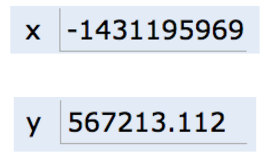
Thus, instead of writing memory box contents in binary, we'll write them in human readable symbols. We will do this throughout the rest of the course. For example, after executing:
```java
int x;
double y;
x = -1431195969;
y = 567213.112;
```
We can represent the program environment using what I call **simplified box notation**, shown below:
#### The Golden Rule of Equals (GRoE)
Now armed with simplified box notation, we can finally start to resolve the Mystery of the Walrus.
It turns out our Mystery has a simple solution: When you write `y = x`, you are telling the Java interpreter to copy the bits from x into y. This Golden Rule of Equals (GRoE) is the root of all truth when it comes to understanding our Walrus Mystery.
```java
int x = 5;
int y;
y = x;
x = 2;
System.out.println("x is: " + x);
System.out.println("y is: " + y);
```
This simple idea of copying the bits is true for ANY assignment using `=` in Java. To see this in action, click [this link](http://cscircles.cemc.uwaterloo.ca/java_visualize/#code=public+class+PollQuestions+%7B%0A+++public+static+void+main\(String%5B%5D+args%29+%7B%0A++++++int+x+%3D+5%3B%0A++++++int+y%3B%0A++++++y+%3D+x%3B%0A++++++x+%3D+2%3B%0A++++++System.out.println\(%22x+is%3A+%22+%2B+x%29%3B%0A++++++System.out.println\(%22y+is%3A+%22+%2B+y%29%3B++++++%0A+++%7D%0A%7D\&mode=display\&curInstr=0).
#### Reference Types
Above, we said that there are 8 primitive types: byte, short, int, long, float, double, boolean, char. Everything else, including arrays, is not a primitive type but rather a `reference type`.
**Object Instantiation**
When we *instantiate* an Object using `new` (e.g. Dog, Walrus, Planet), Java first allocates a box for each instance variable of the class, and fills them with a default value. The constructor then usually (but not always) fills every box with some other value.
For example, if our Walrus class is:
```java
public static class Walrus {
public int weight;
public double tuskSize;
public Walrus(int w, double ts) {
weight = w;
tuskSize = ts;
}
}
```
And we create a Walrus using `new Walrus(1000, 8.3);`, then we end up with a Walrus consisting of two boxes of 32 and 64 bits respectively:
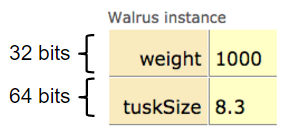
In real implementations of the Java programming language, there is actually some additional overhead for any object, so a Walrus takes somewhat more than 96 bits. However, for our purposes, we will ignore such overhead, since we will never interact with it directly.
The Walrus we've created is anonymous, in the sense that it has been created, but it is not stored in any variable. Let's now turn to variables that store objects.
**Reference Variable Declaration**
When we *declare* a variable of any reference type (Walrus, Dog, Planet, array, etc.), Java allocates a box of 64 bits, no matter what type of object.
At first glance, this might seem to lead to a Walrus Paradox. Our Walrus from the previous section required more than 64 bits to store. Furthermore, it may seem bizarre that no matter the type of object, we only get 64 bits to store it.
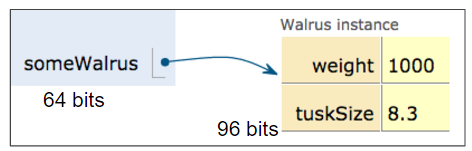
However, this problem is easily resolved with the following piece of information: the 64 bit box contains not the data about the walrus, but instead the address of the Walrus in memory.
As an example, suppose we call:
```java
Walrus someWalrus;
someWalrus = new Walrus(1000, 8.3);
```
The first line creates a box of 64 bits. The second line creates a new Walrus, and the address is returned by the `new` operator. These bits are then copied into the `someWalrus` box according to the GRoE.
If we imagine our Walrus weight is stored starting at bit `5051956592385990207` of memory, and tuskSize starts at bit `5051956592385990239`, we might store `5051956592385990207` in the Walrus variable. In binary, `5051956592385990207` is represented by the 64 bits `0100011000011100001001111100000100011101110111000001111000111111`, giving us in box notation:

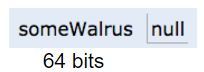
We can also assign the special value `null` to a reference variable, corresponding to all zeros.

**Box and Pointer Notation**
Just as before, it's hard to interpret a bunch of bits inside a reference variable, so we'll create a simplified box notation for reference variable as follows:
* If an address is all zeros, we will represent it with null.
* A non-zero address will be represented by an **arrow** pointing at an object instantiation.
This is also sometimes called "box and pointer" notation.
For the examples from the previous section, we'd have:
**Resolving the Mystery of the Walrus**
We're now finally ready to resolve, fully and completely, the Mystery of the Walrus.
```java
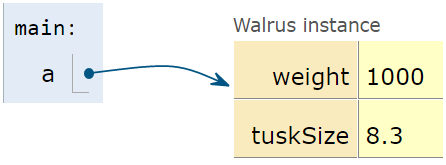
Walrus a = new Walrus(1000, 8.3);
Walrus b;
b = a;
```
After the first line is executed, we have:
After the second line is executed, we have:
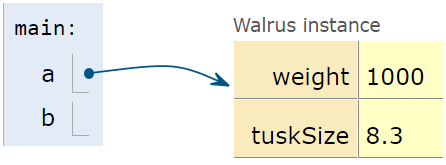
Note that above, b is undefined, not null.
According to the GRoE, the final line simply copies the bits in the `a` box into the `b` box. Or in terms of our visual metaphor, this means that b will copy exactly the arrow in a and now show an arrow pointing at the same object.
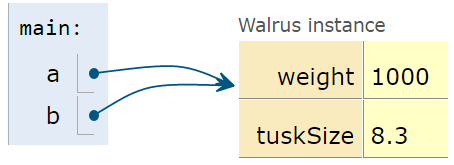
And that's it. There's no more complexity than this.
#### Parameter Passing
When you pass parameters to a function, you are also simply copying the bits. In other words, the GRoE also applies to parameter passing. Copying the bits is usually called "pass by value". In Java, we **always** pass by value.
For example, consider the function below:
```java
public static double average(double a, double b) {
return (a + b) / 2;
}
```
Suppose we invoke this function as shown below:
```java
public static void main(String[] args) {
double x = 5.5;
double y = 10.5;
double avg = average(x, y);
}
```
After executing the first two lines of this function, the main method will have two boxes labeled `x` and `y` containing the values shown below:
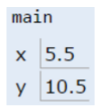
When the function is invoked, the `average` function has its **own** scope with two new boxes labeled as `a` and `b`, and the bits are simply *copied* in. This copying of bits is what we refer to when we say "pass by value".
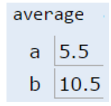
If the `average` function were to change `a`, then `x` in main would be unchanged, since the GRoE tells us that we'd simply be filling in the box labeled `a` with new bits.
**Test Your Understanding**
**Exercise**: Suppose we have the code below:
```java
public class PassByValueFigure {
public static void main(String[] args) {
Walrus walrus = new Walrus(3500, 10.5);
int x = 9;
doStuff(walrus, x);
System.out.println(walrus);
System.out.println(x);
}
public static void doStuff(Walrus W, int x) {
W.weight = W.weight - 100;
x = x - 5;
}
}
```
Does the call to `doStuff` have an effect on walrus and/or x? Hint: We only need to know the GRoE to solve this problem.
#### Instantiation of Arrays
As mentioned above, variables that store arrays are reference variables just like any other. As an example, consider the declarations below:
```java
int[] x;
Planet[] planets;
```
Both of these declarations create memory boxes of 64 bits. `x` can only hold the address of an `int` array, and `planets` can only hold the address of a `Planet` array.
Instantiating an array is very similar to instantiating an object. For example, if we create an integer array of size 5 as shown below:
```
x = new int[]{0, 1, 2, 95, 4};
```
Then the `new` keyword creates 5 boxes of 32 bits each and returns the address of the overall object for assignment to x.
Objects can be lost if you lose the bits corresponding to the address. For example if the only copy of the address of a particular Walrus is stored in `x`, then `x = null` will cause you to permanently lose this Walrus. This isn't necessarily a bad thing, since you'll often decide you're done with an object, and thus it's safe to simply throw away the reference. We'll see this when we build lists later in this chapter.
**The Law of the Broken Futon**
You might ask yourself why we spent so much time and space covering what seems like a triviality. This is probably especially true if you have prior Java experience. The reason is that it is very easy for a student to have a half-cocked understanding of this issue, allowing them to write code, but without true comprehension of what's going on.
While this might be fine in the short term, in the long term, doing problems without full understanding may doom you to failure later down the line. There's a blog post about this so-called [Law of the Broken Futon](https://mathwithbaddrawings.com/2015/04/08/the-math-ceiling-wheres-your-cognitive-breaking-point/) that you might find interesting.
---
# Agent Instructions
This documentation is published with GitBook. GitBook is the documentation platform designed so that both humans and AI agents can read, navigate, and reason over technical content effectively. Learn more at gitbook.com.
## Querying This Documentation
If you need additional information that is not directly available in this page, you can query the documentation dynamically by asking a question.
Perform an HTTP GET request on the current page URL with the `ask` query parameter, and the optional `goal` query parameter:
```
GET https://cs61b-2.gitbook.io/cs61b-textbook-fall-2026/3.-references-recursion-and-lists.md?ask=&goal=
```
`ask` is the immediate question: it should be specific, self-contained, and written in natural language.
`goal` is optional and describes the broader end goal you are ultimately trying to accomplish on behalf of the user. GitBook uses it to tailor the answer towards what is most useful for that goal.
The response will contain a direct answer to the question and relevant excerpts and sources from the documentation.
Use this mechanism when the answer is not explicitly present in the current page, you need clarification or additional context, or you want to retrieve related documentation sections.